Durable Honey Badger
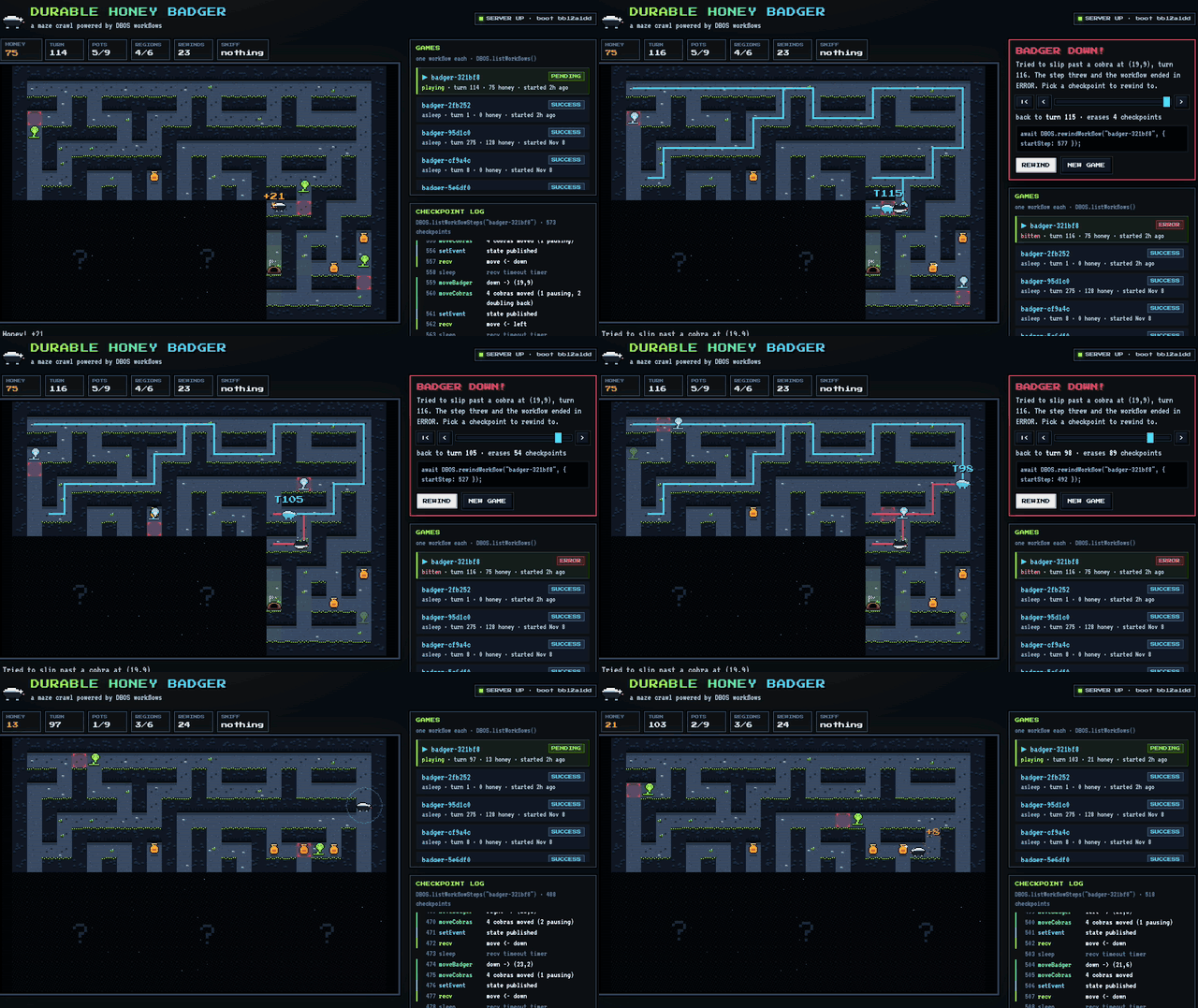
In this example, we use DBOS to build a pixel-art maze game. You steer a honey badger through a maze, eat honey, dodge cobras, and look for the den. Every game is a durable workflow. When a cobra gets the badger, you rewind the workflow to an earlier checkpoint and try again.
This example demonstrates how DBOS handles non-deterministic workflows. The maze, the honey, and every cobra's movements are random, but properly wrapped in DBOS steps. That means you can kill the server mid-game and DBOS brings the game back exactly as you left it, or rewind to any earlier turn and play out a different sequence.
All source code is available on GitHub.
The Game Workflow
Each game is a single long-running durable workflow. It generates a maze, then loops: wait for the player's next move, apply it, let the cobras move, and publish the new state. Here's the workflow, simplified for clarity:
async function badgerGameFn(): Promise<GameResult> {
  const world = await DBOS.runStep(generateWorldStep, { name: 'generateWorld' });
  let s = initialState(world);
  await DBOS.setEvent('state', view(world, s));

  for (;;) {
    // Durably wait for the player's next move
    const msg = await DBOS.recv<GameMessage>('move', { timeoutSeconds: IDLE_TIMEOUT_S });
    if (msg === null) return { outcome: 'napping', honey: s.honey, turns: s.turn };
    if ('rewind' in msg) return { outcome: 'stopped-for-rewind', honey: s.honey, turns: s.turn };

    // Apply the move. This step throws if a cobra gets the badger.
    const rec = await DBOS.runStep(() => moveBadgerStep(world, s, msg.dir), { name: 'moveBadger' });
    s = applyMove(world, s, rec);

    // The badger used a turn, so the cobras get one too
    if (!rec.bumped && s.status === 'alive') {
      const cob = await DBOS.runStep(() => moveCobrasStep(world, s), { name: 'moveCobras' });
      s = applyCobras(s, cob);
    }

    await DBOS.setEvent('state', view(world, s));
    if (s.status === 'escaped') return { outcome: 'escaped', honey: s.honey, turns: s.turn };
  }
}

export const badgerGame = DBOS.registerWorkflow(badgerGameFn, { name: 'badgerGame', maxRecoveryAttempts: 1000 });
There are no game tables in the database.
The game state s is an ordinary local variable, computed only from the workflow's checkpointed step outputs, so DBOS can rebuild it at any point in the game by replaying those checkpoints.
The server starts a new game by starting a new workflow, using the game's ID as the workflow ID:
const id = `badger-${crypto.randomBytes(3).toString('hex')}`;
await DBOS.startWorkflow(badgerGame, { workflowID: id })();
Keeping Randomness in Steps
Workflow code must be deterministic, so anything random belongs in a step.
For example, the amount of honey in a pot is rolled inside the moveBadger step:
async function moveBadgerStep(world: World, s: GameState, dir: Dir): Promise<MoveRecord> {
  const out = resolveMove(world, s, dir);
  if (out.death) throw new BadgerDown(out.death.text);
  // Nondeterministic on purpose: the checkpoint is what keeps this stable across replays.
  const honey = out.ate !== null ? 5 + Math.floor(Math.random() * 21) : 0;
  return { dir, from: s.pos, to: out.to, bumped: out.bumped, ate: out.ate, honey, escaped: out.escaped };
}
The moveCobras step picks a random next tile for every cobra in the same way:
async function moveCobrasStep(world: World, s: GameState): Promise<CobraMoveRecord> {
  // Math.random picks every cobra's next tile. A replay reads the checkpoint instead of
  // rolling again; a rewind deletes the checkpoint, so that turn is rolled anew.
  return moveCobras(world, s.cobras, s.turn, Math.random);
}
When a cobra gets the badger, moveBadger throws and the workflow ends in the ERROR state.
Sending Moves and Publishing State
The workflow communicates with the browser through messages and events. When a player makes a move, the server sends it to the game's workflow, then waits for the workflow to publish the resulting state:
app.post('/api/games/:id/move', route(async (req, res) => {
  // ...
  // idempotency key: a retried request is not a second move
  await DBOS.send<GameMessage>(id, { dir }, 'move', key);
  const state = await waitForState(id, cur.seq);
  res.json({ id, state, workflow: await workflowInfo(id), bootId: BOOT_ID });
}));
Rewinding the Workflow
DBOS.rewindWorkflow discards a workflow's checkpoints from a given step onward and runs it again from that step, keeping its workflow ID.
Here's the server endpoint that rewinds a game to the start of a given turn:
app.post('/api/games/:id/rewind', route(async (req, res) => {
  // ...
  const steps = (await DBOS.listWorkflowSteps(id)) ?? [];
  const cp = checkpoints(steps).find((c) => c.turn === turn);

  if (['PENDING', 'ENQUEUED'].includes(before.status)) {
    // rewindWorkflow needs a finished workflow. Ask the live game to end itself at its recv.
    await DBOS.send<GameMessage>(id, { rewind: true }, 'move', `rewind-${crypto.randomUUID()}`);
    await waitUntilFinished(id);
  }
  await DBOS.rewindWorkflow(id, { startStep: cp.startStep });
  // ...
}));
There are two cases.
After a cobra gets the badger, the workflow has already ended in ERROR, so the server can rewind it directly.
A game still in progress must finish first, because only a workflow in a terminal state can be rewound.
Cancelling isn't a good fit here because a cancelled workflow can still be waiting in recv when the rewind re-enqueues it, so the server instead sends a { rewind: true } message and the workflow returns cleanly.
The rewind targets come from DBOS.listWorkflowSteps.
For each turn, startStep is the step right after the setEvent that published that turn's state, which is the recv that waits for the next move.
Everything before startStep is replayed from its checkpoints, so the badger, the honey, and the cobras all go back to exactly where they were on that turn with no extra code, and the state event rolls back with them.
Everything after startStep runs again with new random rolls, so the cobras likely will not repeat the timeline you just erased.
Recovering from a Crash
Kill the server mid-game:
pkill -9 -f src/server.ts
Then start it again.
On startup, DBOS.launch() recovers the game's workflow and replays its checkpoints.
Neither the badger nor the cobras have moved, because their random moves come back from the checkpoints rather than being rolled again.
Showing the Checkpoint Log
The game's log panel shows each game's checkpoints as you play, read directly from DBOS.listWorkflowSteps.
Each move adds a recv, a moveBadger step, a moveCobras step, and a setEvent.
To keep moves fast in long games, the browser fetches only the new steps after each move, using the offset option:
const steps = await DBOS.listWorkflowSteps(id, { offset: from });
The list of past games uses DBOS.listWorkflows in the same way.
Every game is its own workflow, so you can leave one and come back to it later.
Try it Yourself!
Clone and enter the dbos-demo-apps repository:
git clone https://github.com/dbos-inc/dbos-demo-apps.git
cd dbos-demo-apps/typescript/durable-honey-badger
Then follow the instructions in the README to run the app.