Queue Worker
This example is also available in Python.
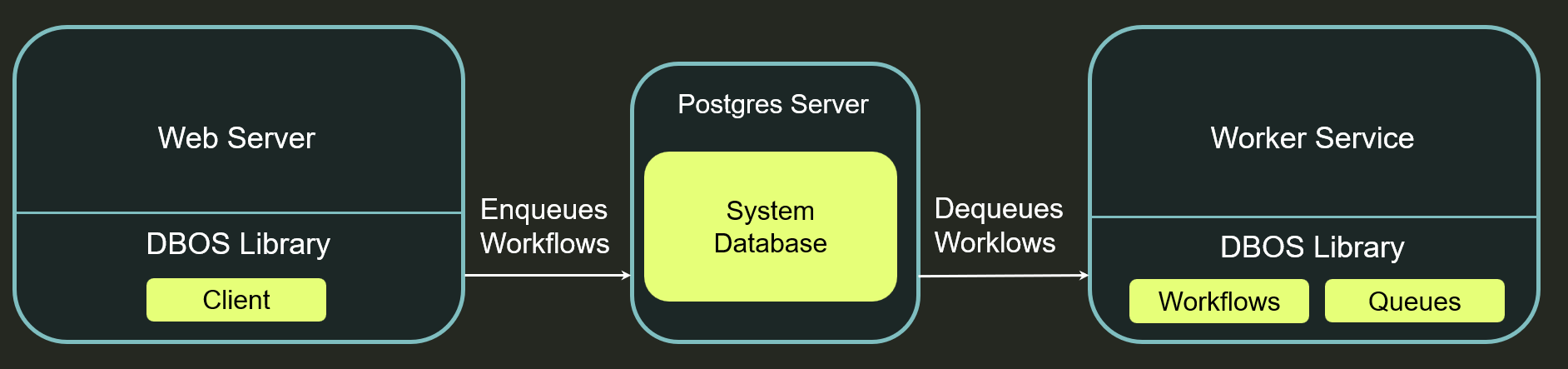
This example demonstrates how to run DBOS workflows in their own "queue worker" service while enqueueing and managing them from other services. This design pattern lets you separate concerns and separately scale the workers that execute your durable workflows from your other services.
Architecturally, this example contains two services: a web server and a worker service. The web server uses the DBOS Client to enqueue workflows and monitor their status. The worker service dequeues and executes workflows.
All source code is available on GitHub.
Worker Service
The worker service implements your durable workflows and their steps.
Notably, this workflow periodically reports its progress using DBOS.setEvent.
This lets the web server query the event to monitor workflow progress.
DBOS.registerWorkflow(
  async function (numSteps: number): Promise<void> {
    const progress = {
      steps_completed: 0,
      num_steps: numSteps,
    };
    // The server can query this event to obtain
    // the current progress of the workflow
    await DBOS.setEvent(WF_PROGRESS_KEY, progress);
    for (let i = 0; i < numSteps; i++) {
      await DBOS.runStep(() => stepFunction(i));
      // Update workflow progress each time a step completes
      progress.steps_completed = i + 1;
      await DBOS.setEvent(WF_PROGRESS_KEY, progress);
    }
  },
  { name: 'workflow' },
);

async function stepFunction(i: number): Promise<void> {
  console.log(`Step ${i} completed!`);
  // Sleep one second
  await new Promise((resolve) => setTimeout(resolve, 1000));
}
In its main function, the worker service configures and launches DBOS, registers the queue on which the web server can submit workflows for execution, then waits indefinitely, dequeuing and executing workflows:
async function main(): Promise<void> {
  const systemDatabaseUrl =
    process.env.DBOS_SYSTEM_DATABASE_URL || 'postgresql://postgres:dbos@localhost:5432/dbos_queue_worker';
  DBOS.setConfig({
    name: 'dbos-queue-worker',
    applicationVersion: '0.1.0',
    systemDatabaseUrl: systemDatabaseUrl,
  });
  await DBOS.launch();
  // Define a queue on which the web server
  // can submit workflows for execution.
  await DBOS.registerQueue('workflow-queue');
  // After launching DBOS, the worker waits indefinitely,
  // dequeuing and executing workflows.
  console.log('Worker started, waiting for workflows...');
  await new Promise(() => {});
}

main().catch(console.log);
Web Server
The web server first creates a DBOS Client:
const systemDatabaseUrl =
  process.env.DBOS_SYSTEM_DATABASE_URL || 'postgresql://postgres:dbos@localhost:5432/dbos_queue_worker';
const client = await DBOSClient.create({ systemDatabaseUrl });
It then enqueues workflows using the client:
app.post('/api/workflows', async (_req: Request, res: Response) => {
  const numSteps = 10;
  await client.enqueue(
    {
      queueName: 'workflow-queue',
      workflowName: 'workflow',
    },
    numSteps,
  );
  res.json({ status: 'enqueued' });
});
The web server can also report workflow status.
This function first lists all workflows, then uses getEvent to query the progress of each workflow.
This is a useful pattern for showing workflow progress or status to end users of your application.
app.get('/api/workflows', async (_req: Request, res: Response) => {
  // Use the DBOS client to list all workflows
  const workflows = await client.listWorkflows({
    workflowName: 'workflow',
    sortDesc: true,
  });
  const statuses: WorkflowStatus[] = [];
  for (const workflow of workflows) {
    // Query each workflow's progress event. This may not be available
    // if the workflow has not yet started executing.
    const progress = await client.getEvent<ProgressEvent>(workflow.workflowID, WF_PROGRESS_KEY, 0);
    const status: WorkflowStatus = {
      workflow_id: workflow.workflowID,
      workflow_status: workflow.status,
      steps_completed: progress ? progress.steps_completed : null,
      num_steps: progress ? progress.num_steps : null,
    };
    statuses.push(status);
  }
  res.json(statuses);
});
Try it Yourself!
Clone and enter the dbos-demo-apps repository:
git clone https://github.com/dbos-inc/dbos-demo-apps.git
cd dbos-demo-apps/typescript/queue-worker
Then follow the instructions in the README to run the app.