CI/CD Slackbot
In this example, we use DBOS and Bolt to build a CI/CD Slackbot that helps you trigger application deployments and track deployment pipeline progress directly from Slack. It listens to commands such as /deploy and /check_status in a Slack channel and posts status updates back to the channel.
This app demonstrates how DBOS enables:
- Asynchronous background workflows for each deployment. The Slackbot can't synchronously run an entire deployment pipeline (Slackbots have a 3 second time limit), so it instead durably enqueues the pipeline to run in the background.
- Concurrency control using queues. In this example, the deployment pipeline utilizes a queue with a concurrency limit of 1, so only one deployment can run at a time.
- Real-time status updates via DBOS events, allowing you to monitor the progress of your deployment pipelines.
- Durable execution making sure an application deployment resumes from where it left off even if the Slackbot crashes or restarts.
All source code is available on GitHub.
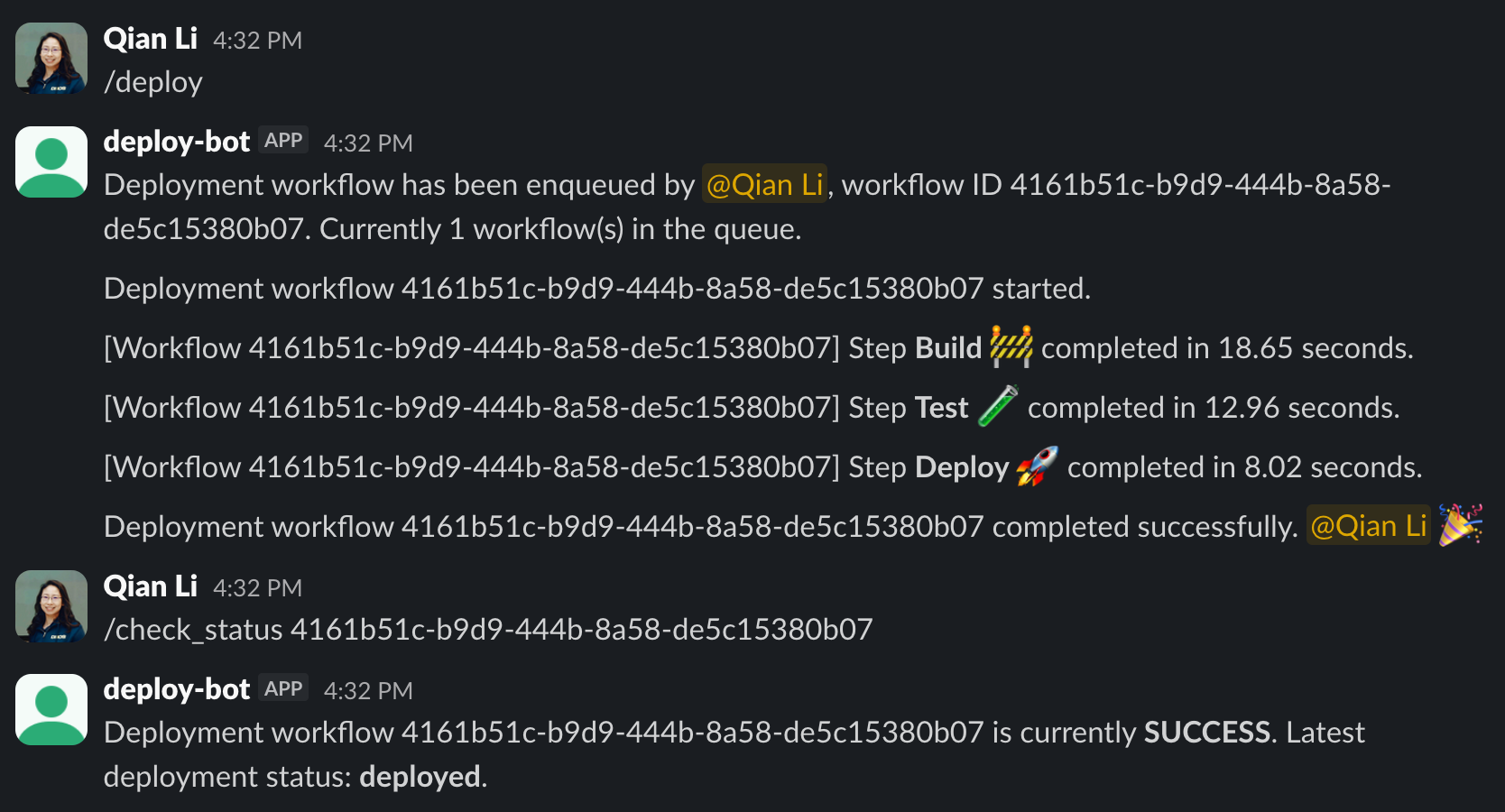
Main Deployment Workflow
The core of this Slackbot is the main deployment workflow.
It contains three steps: build, test, and deploy. When the workflow starts, it notifies the Slack channel and updates the status to "started". Then, after each step finishes, it sends a Slack message to notify users about its progress. It also uses DBOS.set_event to set a custom status object that users can query.
After all steps are complete, it sends a final Slack message to the channel.
@DBOS.workflow()
def deploy_tracker_workflow(user_id: str, channel_id: str):
    post_slack_message(
        message=f"Deployment workflow {DBOS.workflow_id} started.", channel=channel_id
    )
    # Use DBOS's built-in event tracking to mark deployment status
    DBOS.set_event("deploy_status", "started")

    # Additional steps for deployment can be added here
    duration = build_step()
    post_slack_message(
        message=f"[Workflow {DBOS.workflow_id}] Step *Build 🚧* completed in {duration:.2f} seconds.",
        channel=channel_id,
    )
    DBOS.set_event("deploy_status", "build_completed")

    duration = test_step()
    post_slack_message(
        message=f"[Workflow {DBOS.workflow_id}] Step *Test 🧪* completed in {duration:.2f} seconds.",
        channel=channel_id,
    )
    DBOS.set_event("deploy_status", "tests_completed")

    duration = deploy_step()
    post_slack_message(
        message=f"[Workflow {DBOS.workflow_id}] Step *Deploy 🚀* completed in {duration:.2f} seconds.",
        channel=channel_id,
    )
    DBOS.set_event("deploy_status", "deployed")

    post_slack_message(
        message=f"Deployment workflow {DBOS.workflow_id} completed successfully. <@{user_id}> :tada:",
        channel=channel_id,
    )
Concurrency-Limited Queue
To ensure only one deployment workflow runs at a time, we register a queue with global_concurrency=1. This is helpful when the deployment pipeline consumes significant resources and you don't want to exhaust your resource pool when multiple users trigger deployments.
# Create a queue with concurrency of 1 so only one deployment workflow runs at a time
DBOS.register_queue("deploy-tracker-queue", global_concurrency=1)
Because register_queue writes the configuration to the system database, it must be called after DBOS.launch().
Handle Slash Commands in Slack
We need to define handlers to handle each Slash Command from Slack. Here, we implement two commands: /deploy and /check_status.
Handle /deploy
This command enqueues a deployment workflow and acknowledges the user as soon as the workflow is confirmed to be enqueued (due to the 3-second limit). It also lists workflows in the queue and provides information on how many workflows are currently queued.
@app.command("/deploy")
def handle_deploy_command(ack, say, command, logger):
    try:
        # Acknowledge the command within 3 seconds, after confirming the workflow has enqueued
        user_id = command["user_id"]
        channel_id = command["channel_id"]
        handle = DBOS.enqueue_workflow(
            "deploy-tracker-queue", deploy_tracker_workflow, user_id, channel_id
        )
        ack({"response_type": "in_channel"})
        # Check the queue size, and inform the user if there are pending workflows
        queued_workflows = DBOS.list_queued_workflows(
            queue_name="deploy-tracker-queue", load_input=False
        )
        queue_size = len(queued_workflows)
        say(
            f"Deployment workflow has been enqueued by <@{user_id}>, workflow ID {handle.get_workflow_id()}. Currently {queue_size} workflow(s) in the queue."
        )

        # Wait for workflow to complete
        handle.get_result()

    except Exception as e:
        logger.error(f"Error handling slash command: {e}")
        say(f"An error occurred while processing your deployment request: {e}")
Handle /check_status
This endpoint queries the workflow status as well as the custom "deploy_status" event set by the deployment workflow. Users can query the status of their deployment pipelines anytime.
@app.command("/check_status")
def handle_check_status_command(ack, body, say, logger):
    try:
        # Acknowledge the command within 3 seconds
        ack({"response_type": "in_channel"})
        workflow_id = body["text"].strip()

        # Check the workflow status and latest deployment status
        handle = DBOS.retrieve_workflow(workflow_id, existing_workflow=False)
        status = handle.get_status().status
        deploy_status = DBOS.get_event(workflow_id, "deploy_status", 10)

        say(
            f"Deployment workflow {workflow_id} is currently *{status}*. Latest deployment status: *{deploy_status}*."
        )

    except Exception as e:
        logger.error(f"Error handling slash command: {e}")
        say(f"An error occurred while processing your check status request: {e}")
Try it Yourself!
Clone and enter the dbos-demo-apps repository:
git clone https://github.com/dbos-inc/dbos-demo-apps.git
cd dbos-demo-apps/python/deploy-tracker-slackbot
Then follow the instructions in the README to run the app.