Use DBOS On Vercel
You can use DBOS to add durable workflows, background jobs, or AI agents to your Next.js app hosted on Vercel. We recommend the following architecture:
- In your Next.js app, enqueue workflows for execution using the DBOS client.
- Create a DBOS worker in a Vercel Function to serverlessly dequeue and execute your workflows.
- Configure a Vercel cron job to periodically start your worker to poll for new workflows to execute.
Your DBOS client and worker should both connect to a Postgres database—for example a Supabase or Neon database configured through Vercel Postgres.
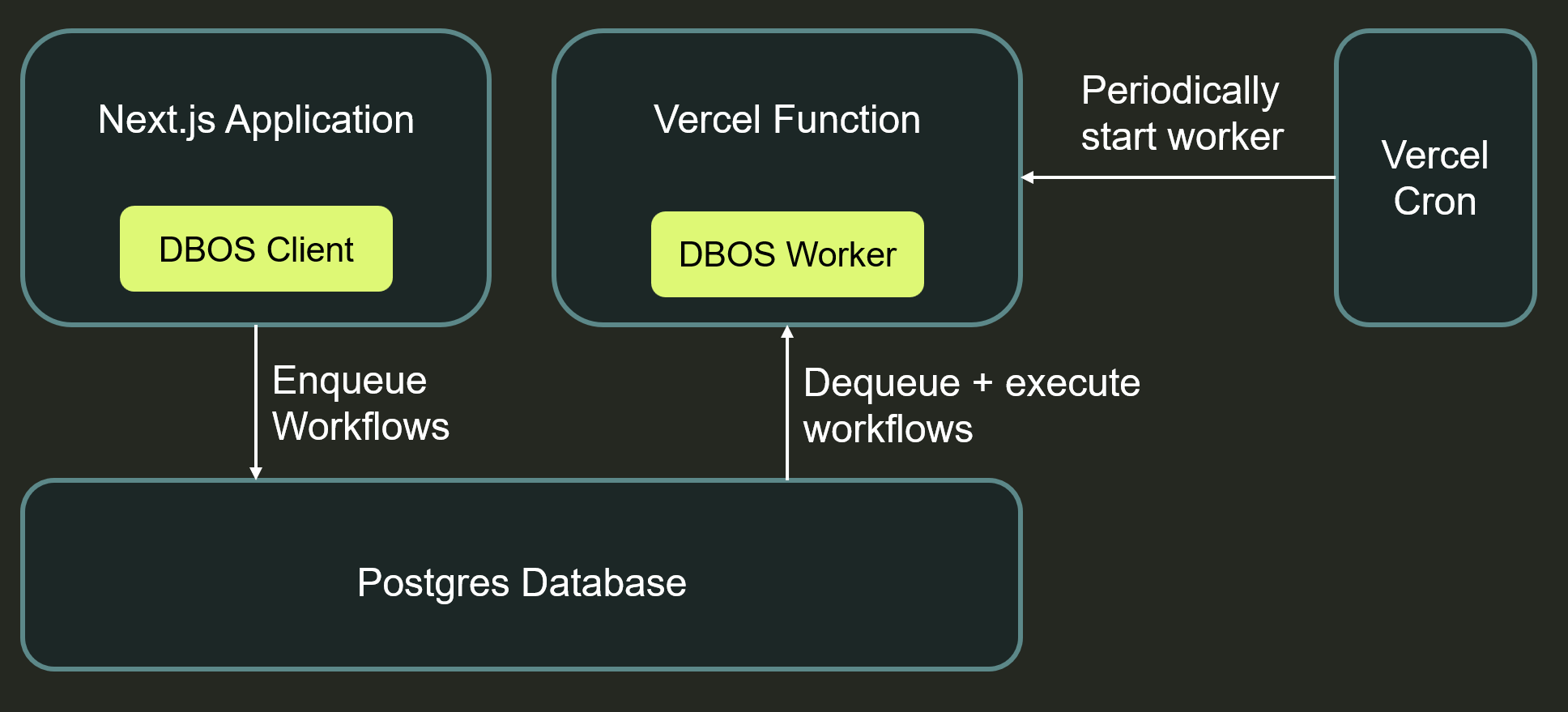
You can check out a working example of this integration on GitHub.
1. Enqueue Workflows From Server Actions
First, enqueue workflows from your Next.js app using the DBOS client in your server actions.
For example, here's a server action that enqueues a workflow to execute in the background:
'use server';

import { DBOSClient } from '@dbos-inc/dbos-sdk';

export async function enqueueWorkflow() {
    console.log('Enqueueing DBOS workflow');
    const client = await DBOSClient.create({ systemDatabaseUrl: process.env.DBOS_SYSTEM_DATABASE_URL! });
    await client.enqueue({
        workflowName: 'exampleWorkflow',
        queueName: 'exampleQueue',
    });
    await client.destroy();
}
You can also use the client to list past workflows or retrieve their results.
2. Create a Worker in a Vercel Function
Next, create a DBOS worker in a Vercel Function to serverlessly dequeue and execute your workflows. In the Vercel Function, define and register your workflows, steps, and queues:
import { DBOS } from '@dbos-inc/dbos-sdk';
import { waitUntil } from '@vercel/functions';

// Define a workflow and steps
async function stepOne() {
  // Sleep 3 seconds
  await new Promise((resolve) => setTimeout(resolve, 3000));
  DBOS.logger.info('Step one completed!');
}

async function stepTwo() {
  // Sleep 3 seconds
  await new Promise((resolve) => setTimeout(resolve, 3000));
  DBOS.logger.info('Step two completed!');
}

async function exampleFunction() {
  await DBOS.runStep(() => stepOne(), { name: 'stepOne' });
  await DBOS.runStep(() => stepTwo(), { name: 'stepTwo' });
}

// Register your workflow with DBOS
DBOS.registerWorkflow(exampleFunction, {
  name: 'exampleWorkflow',
});
Then, configure and launch DBOS on worker startup, and register the queue. When started, the worker will poll your queues and execute your workflows, waiting until all enqueued workflows complete or a timeout is reached. If some workflows are still executing when the worker times out, don't worry—DBOS will automatically recover them when the worker next starts.
// Configure and launch DBOS. It will automatically dequeue and execute workflows.
DBOS.setConfig({
  name: 'dbos-vercel-integration',
  applicationVersion: '0.1.0',
  systemDatabaseUrl: process.env.DBOS_SYSTEM_DATABASE_URL,
});
await DBOS.launch();
await DBOS.registerQueue('exampleQueue');

// After the worker Vercel function is launched,
// it waits for either all enqueued workflows
// to complete or for a timeout to be reached
async function waitForQueuedWorkflowsToComplete(timeoutMs: number): Promise<void> {
  const startTime = Date.now();
  const intervalMs = 1000;
  while (true) {
    if (Date.now() - startTime >= timeoutMs) {
      throw new Error(`Timeout reached after ${timeoutMs}ms - queued workflows still exist`);
    }
    const queuedWorkflows = await DBOS.listQueuedWorkflows({queueName: 'exampleQueue'});
    if (queuedWorkflows.length === 0) {
      console.log('All queued workflows completed');
      return;
    }
    console.log(`${queuedWorkflows.length} workflows still queued, waiting...`);
    await new Promise<void>((resolve) => setTimeout(resolve, intervalMs));
  }
}

export async function GET(request: Request) {
  waitUntil(waitForQueuedWorkflowsToComplete(300000));
  return new Response(`Starting DBOS worker! Request URL: ${request.url}`);
}
3. Schedule the Worker with Cron
Finally, configure a Vercel cron job to periodically start your worker to poll for new workflows to execute. Vercel will automatically scale the worker function to handle your workflows.
For example, you might configure your worker to poll for new workflows once a minute:
{
  "$schema": "https://openapi.vercel.sh/vercel.json",
  "crons": [
    {
      "path": "/api/dbos",
      "schedule": "* * * * *"
    }
  ]
}