DBOSify: Drop-in Temporal Replacement
You can run your existing Temporal code on DBOS with DBOSify. DBOSify is a drop-in replacement for the Temporal Python SDK that uses Postgres (through DBOS Transact) instead of a Temporal server. It runs your workflows, activities, signals, updates, queries, retries, and recovery with no infrastructure except Postgres.
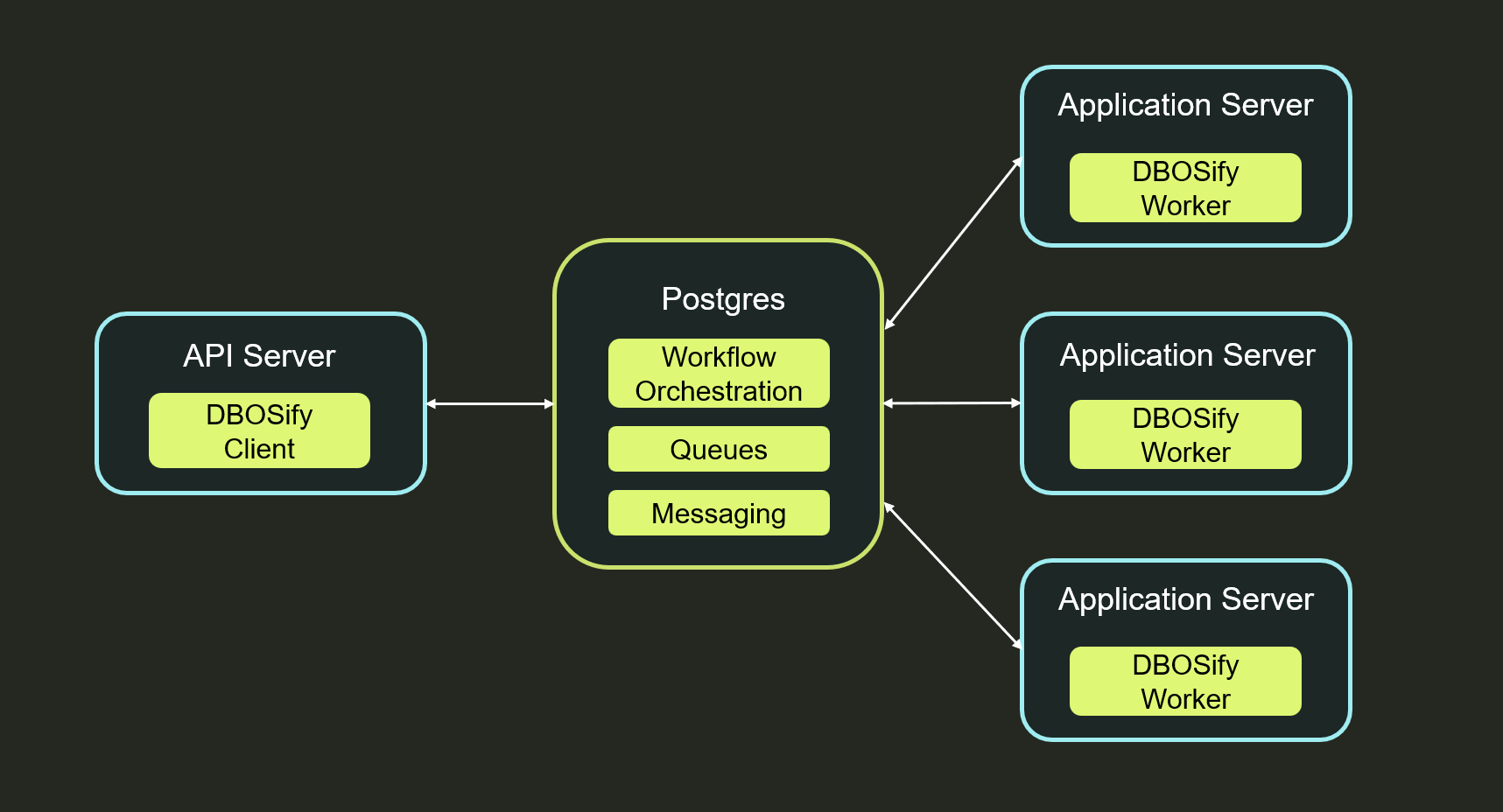
To migrate, you import dbosify instead of temporalio and connect your clients and workers to a Postgres database instead of a Temporal server.
DBOSify only supports Python for now. For architectural details and detailed feature compatibility, see the DBOSify architecture page.
To rewrite a Temporal application to use DBOS natively (in Python, TypeScript, Go, or Java), see Migrating From Temporal.
Using DBOSify
Install DBOSify:
pip install dbosify
Then import dbosify instead of temporalio and connect to Postgres instead of a Temporal server:
DBOSify Example
import asyncio
import os
from datetime import timedelta

from dbosify import activity, workflow
from dbosify.client import Client
from dbosify.worker import Worker

# A connection string to your Postgres database, instead of a Temporal server address
DB_URL = os.environ.get("DBOS_SYSTEM_DATABASE_URL")


@activity.defn
async def compose_greeting(name: str) -> str:
    return f"Hello, {name}!"


@workflow.defn
class GreetingWorkflow:
    @workflow.run
    async def run(self, name: str) -> str:
        return await workflow.execute_activity(
            compose_greeting, name, start_to_close_timeout=timedelta(seconds=10)
        )


async def main() -> None:
    worker = Worker(
        DB_URL,
        task_queue="greetings",
        workflows=[GreetingWorkflow],
        activities=[compose_greeting],
    )
    async with worker:
        async with await Client.connect(DB_URL) as client:
            result = await client.execute_workflow(
                GreetingWorkflow.run, "World", id="greeting-1", task_queue="greetings"
            )
            print(result)  # Hello, World!


if __name__ == "__main__":
    asyncio.run(main())
Connection API
Where a Temporal application connects to a Temporal server, a DBOSify application connects to Postgres.
Both the client and the worker take a Postgres connection string.
For more control, you can also construct a client from a dbos.DBOSClient and a worker from a dbos.DBOSConfig.
Client: Connect a client with Client.connect:
client = await Client.connect(
    system_database_url,    # Postgres connection string
    namespace="default",    # optional; each namespace maps to its own Postgres schema
)
For full control, instead build a dbos.DBOSClient yourself and pass it to the Client(...) constructor.
Worker: To configure a Worker, pass it a Postgres connection string or a dbos.DBOSConfig:
worker = Worker(
    config,                         # Postgres connection string or a dbos.DBOSConfig
    task_queue="greetings",         # required
    namespace="default",            # optional
    workflows=[GreetingWorkflow],
    activities=[compose_greeting],
)
await worker.run()                  # or use `async with worker:`