Alerting
If you are using Conductor, you can configure automatic alerts when certain failure conditions are met. You can configure alerts either in Conductor directly or on Conductor-exported metrics using your existing observability stack.
Alerts require at least a DBOS Teams plan.
Creating Alerts
You can create alerting rules (and view or delete your existing rules) from your application's "Alerting" page on the DBOS Console, or through the Conductor API. Rules cannot be edited after they are created; to change a rule, delete it and create a new one.
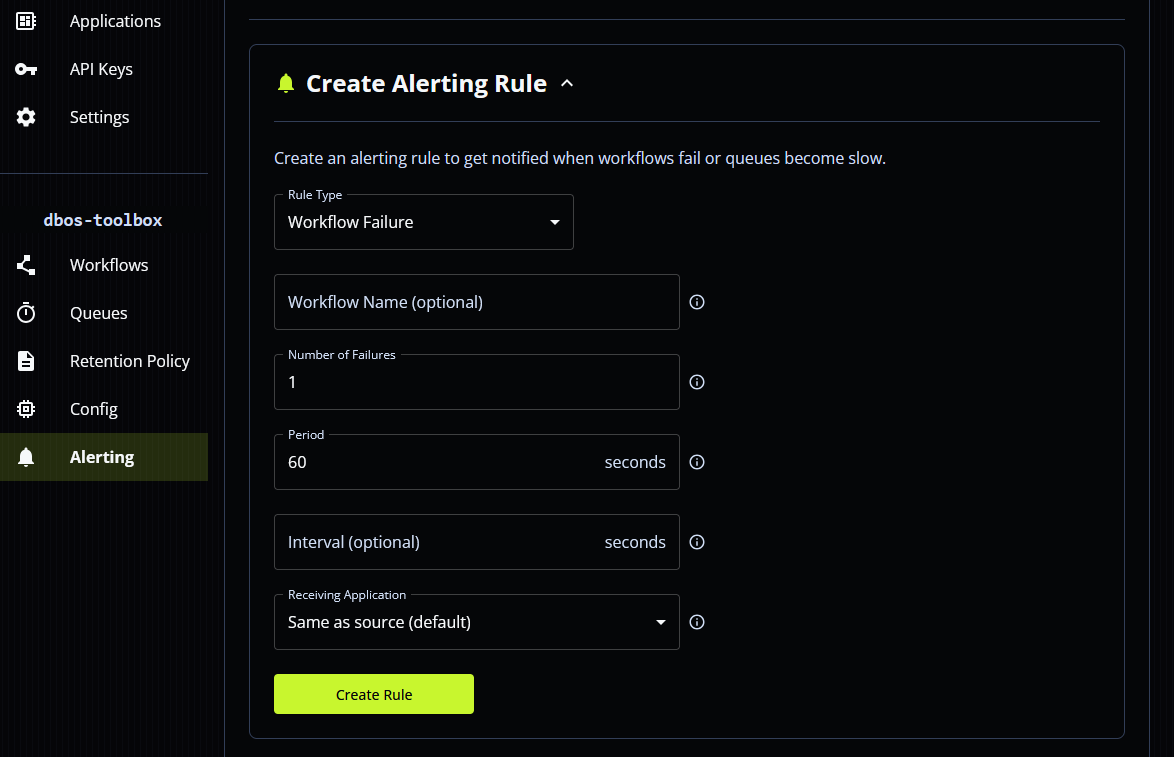
Currently, you can create alerts for the following failure conditions:
- Workflow Failure: If at least a certain number of workflows (optionally filtered by workflow name) created within a set time window have failed with an error.
- Slow Queue: If a workflow remains enqueued for more than a certain period of time (optionally filtered by queue name), indicating the queue is overwhelmed or stuck.
To monitor all workflows or all queues, omit the workflow or queue name filter (do not pass *).
- Unresponsive Application: If an application is unresponsive (no healthy executors, or healthy executors that fail to respond to a probe request from Conductor).
Conductor evaluates each rule once per minute. While a rule's condition holds, the rule fires again on every evaluation. To limit how often a rule fires, set its optional Interval: the minimum time, in seconds, between two alerts from that rule.
If multiple applications share a system database, each application's alerts consider only the workflows it owns.
You may also specify an application to receive the alert—this does not need to be the same as the application that generated the alert, and defaults to it. For Unresponsive Application rules, the application receiving the alert is required to be different from the one generating it.
Conductor delivers each alert to one healthy executor of the receiving application. If that executor's handler throws an error, Conductor tries the receiving application's other healthy executors. If the receiving application has no healthy executors, the alert is not delivered.
Receiving Alerts
You can register an alert handler in your application to receive alerts from Conductor. Your handler can log the alerts or forward them to another system, such as Slack or PagerDuty.
Only one alert handler may be registered per application, and it must be registered before launching DBOS. If no handler is registered, alerts are logged automatically.
The handler receives three arguments:
-
rule_type: The type of alert rule. One of
WorkflowFailure,SlowQueue, orUnresponsiveApplication. -
message: The alert message.
-
metadata: Additional key-value string metadata about the alert. The metadata keys depend on the rule type:
WorkflowFailure:workflow_name: The rule's workflow name filter, or*if the rule has no filter and monitors all workflows.failed_workflow_count: The number of failed workflows detected in the time window.threshold: The configured failure count threshold.period_secs: The time window in seconds.
SlowQueue:queue_name: The rule's queue name filter, or*if the rule has no filter and monitors all queues.stuck_workflow_count: The number of workflows that have been in the queue for longer than the time threshold.threshold_secs: The enqueue time threshold in seconds.
UnresponsiveApplication:application_name: The application name.connected_executor_count: The number of healthy executors currently connected to this application.
- Python
- Go
- Typescript
- Java
Example logging alerts:
from dbos import DBOS

@DBOS.alert_handler
def handle_alert(rule_type: str, message: str, metadata: dict[str, str]) -> None:
    DBOS.logger.warning(f"Alert received: {rule_type} - {message}")
    for key, value in metadata.items():
        DBOS.logger.warning(f"  {key}: {value}")
Example forwarding alerts to Slack using incoming webhooks
import os
import requests

@DBOS.alert_handler
def handle_alert(rule_type: str, message: str, metadata: dict[str, str]) -> None:
    webhook_url = os.environ.get("SLACK_WEBHOOK_URL")

    slack_text = f"*Alert: {rule_type}*\n{message}\n" + "\n".join(f"• {k}: {v}" for k, v in metadata.items())

    try:
        resp = requests.post(webhook_url, json={"text": slack_text}, timeout=10)
        resp.raise_for_status()
    except requests.RequestException as e:
        DBOS.logger.error(f"Failed to send Slack alert: {e}")
Example forwarding alerts to PagerDuty using the Events API:
import os
import requests

@DBOS.alert_handler
def handle_alert(rule_type: str, message: str, metadata: dict[str, str]) -> None:
    routing_key = os.environ.get("PAGERDUTY_ROUTING_KEY")

    payload = {
        "routing_key": routing_key,
        "event_action": "trigger",
        "payload": {
            "summary": f"{rule_type}: {message}",
            "severity": "error",
            "source": "my-app",
            "custom_details": metadata,
        },
    }

    try:
        resp = requests.post(
            "https://events.pagerduty.com/v2/enqueue",
            json=payload,
            timeout=10,
        )
        resp.raise_for_status()
    except requests.RequestException as e:
        DBOS.logger.error(f"Failed to send PagerDuty alert: {e}")
See the Python reference for more details.
Example logging alerts:
dbos.SetAlertHandler(dbosContext, func(ruleType string, message string, metadata map[string]string) {
    slog.Warn(fmt.Sprintf("Alert received: %s - %s", ruleType, message))
    for key, value := range metadata {
        slog.Warn(fmt.Sprintf("  %s: %s", key, value))
    }
})
Example forwarding alerts to Slack using incoming webhooks
dbos.SetAlertHandler(dbosContext, func(ruleType string, message string, metadata map[string]string) {
    webhookURL := os.Getenv("SLACK_WEBHOOK_URL")

    var metaParts []string
    for k, v := range metadata {
        metaParts = append(metaParts, fmt.Sprintf("• %s: %s", k, v))
    }
    slackText := fmt.Sprintf("*Alert: %s*\n%s\n%s", ruleType, message, strings.Join(metaParts, "\n"))

    body, _ := json.Marshal(map[string]string{"text": slackText})
    resp, err := http.Post(webhookURL, "application/json", bytes.NewReader(body))
    if err != nil {
        slog.Error(fmt.Sprintf("Failed to send Slack alert: %v", err))
        return
    }
    defer resp.Body.Close()
})
Example forwarding alerts to PagerDuty using the Events API:
dbos.SetAlertHandler(dbosContext, func(ruleType string, message string, metadata map[string]string) {
    routingKey := os.Getenv("PAGERDUTY_ROUTING_KEY")

    payload := map[string]any{
        "routing_key":  routingKey,
        "event_action": "trigger",
        "payload": map[string]any{
            "summary":        fmt.Sprintf("%s: %s", ruleType, message),
            "severity":       "error",
            "source":         "my-app",
            "custom_details": metadata,
        },
    }

    body, _ := json.Marshal(payload)
    resp, err := http.Post("https://events.pagerduty.com/v2/enqueue", "application/json", bytes.NewReader(body))
    if err != nil {
        slog.Error(fmt.Sprintf("Failed to send PagerDuty alert: %v", err))
        return
    }
    defer resp.Body.Close()
})
See the Go reference for more details.
Example logging alerts:
DBOS.setAlertHandler(async (ruleType: string, message: string, metadata: Record<string, string>) => {
  DBOS.logger.warn(`Alert received: ${ruleType} - ${message}`);
  for (const [key, value] of Object.entries(metadata)) {
    DBOS.logger.warn(`  ${key}: ${value}`);
  }
});
Example forwarding alerts to Slack using incoming webhooks
DBOS.setAlertHandler(async (ruleType: string, message: string, metadata: Record<string, string>) => {
  const webhookUrl = process.env.SLACK_WEBHOOK_URL!;
  const slackText = `*Alert: ${ruleType}*\n${message}\n` +
    Object.entries(metadata).map(([k, v]) => `• ${k}: ${v}`).join("\n");

  const resp = await fetch(webhookUrl, {
    method: "POST",
    headers: { "Content-Type": "application/json" },
    body: JSON.stringify({ text: slackText }),
  });
  if (!resp.ok) {
    DBOS.logger.error(`Failed to send Slack alert: ${resp.status}`);
  }
});
Example forwarding alerts to PagerDuty using the Events API:
DBOS.setAlertHandler(async (ruleType: string, message: string, metadata: Record<string, string>) => {
  const routingKey = process.env.PAGERDUTY_ROUTING_KEY!;
  const payload = {
    routing_key: routingKey,
    event_action: "trigger",
    payload: {
      summary: `${ruleType}: ${message}`,
      severity: "error",
      source: "my-app",
      custom_details: metadata,
    },
  };

  const resp = await fetch("https://events.pagerduty.com/v2/enqueue", {
    method: "POST",
    headers: { "Content-Type": "application/json" },
    body: JSON.stringify(payload),
  });
  if (!resp.ok) {
    DBOS.logger.error(`Failed to send PagerDuty alert: ${resp.status}`);
  }
});
See the TypeScript reference for more details.
Example logging alerts:
import dev.dbos.transact.DBOS;
import org.slf4j.Logger;
import org.slf4j.LoggerFactory;

Logger logger = LoggerFactory.getLogger("AlertHandler");

dbos.registerAlertHandler((ruleType, message, metadata) -> {
    logger.warn("Alert received: {} - {}", ruleType, message);
    metadata.forEach((key, value) -> logger.warn("  {}: {}", key, value));
});
Example forwarding alerts to Slack using incoming webhooks
dbos.registerAlertHandler((ruleType, message, metadata) -> {
    String webhookUrl = System.getenv("SLACK_WEBHOOK_URL");

    String metaLines = metadata.entrySet().stream()
        .map(e -> "• " + e.getKey() + ": " + e.getValue())
        .collect(Collectors.joining("\n"));
    String slackText = String.format("*Alert: %s*\n%s\n%s", ruleType, message, metaLines);

    try {
        String body = new ObjectMapper().writeValueAsString(Map.of("text", slackText));
        HttpRequest request = HttpRequest.newBuilder()
            .uri(URI.create(webhookUrl))
            .header("Content-Type", "application/json")
            .POST(HttpRequest.BodyPublishers.ofString(body))
            .build();
        HttpResponse<String> resp = HttpClient.newHttpClient().send(request, HttpResponse.BodyHandlers.ofString());
        if (resp.statusCode() >= 300) {
            logger.error("Failed to send Slack alert: {}", resp.statusCode());
        }
    } catch (Exception e) {
        logger.error("Failed to send Slack alert: {}", e.getMessage());
    }
});
Example forwarding alerts to PagerDuty using the Events API:
dbos.registerAlertHandler((ruleType, message, metadata) -> {
    String routingKey = System.getenv("PAGERDUTY_ROUTING_KEY");

    Map<String, Object> payload = Map.of(
        "routing_key", routingKey,
        "event_action", "trigger",
        "payload", Map.of(
            "summary", ruleType + ": " + message,
            "severity", "error",
            "source", "my-app",
            "custom_details", metadata));

    try {
        String body = new ObjectMapper().writeValueAsString(payload);
        HttpRequest request = HttpRequest.newBuilder()
            .uri(URI.create("https://events.pagerduty.com/v2/enqueue"))
            .header("Content-Type", "application/json")
            .POST(HttpRequest.BodyPublishers.ofString(body))
            .build();
        HttpResponse<String> resp = HttpClient.newHttpClient().send(request, HttpResponse.BodyHandlers.ofString());
        if (resp.statusCode() >= 300) {
            logger.error("Failed to send PagerDuty alert: {}", resp.statusCode());
        }
    } catch (Exception e) {
        logger.error("Failed to send PagerDuty alert: {}", e.getMessage());
    }
});
See the Java reference for more details.
Metrics-Based Alerts
If you scrape Conductor metrics into a monitoring system such as Prometheus (with Alertmanager), Datadog, or Grafana, you can define alerts directly on DBOS metrics. This is an alternative to the Conductor-managed alerts above, useful if you already run a monitoring and alerting stack.
Here are some example alerting conditions written in PromQL:
Elevated workflow failures: more than 10 workflows failing per minute for an application:
sum by (application) (dbos_conductor_v1_workflow_failed_rate) * 60 > 10
Stuck queue: a workflow has been waiting in a queue for more than 5 minutes:
time() - dbos_conductor_v1_workflow_oldest_enqueued_timestamp_seconds > 300
Application offline: no healthy executors are connected for an application:
absent(dbos_conductor_v1_executor_count{application="my-app", status="HEALTHY"})
Detecting an offline application is a "missing data" condition: an application with no healthy executors emits no status="HEALTHY" series at all (its disconnected executors are reported with status DISCONNECTED or DEAD instead).
In PromQL, use absent() with an explicit application label for each app you want to monitor.